Modern Workflow

Department of Sociology | University of Texas at Austin

Casey Breen

Workflow and collaboration tools

  • One-hour session

Session goals

High-level introduction to three tools:

  1. Git + GitHub
  1. Latex / Overleaf / Markdown (Quarto)
  1. Zotero for managing references

Why invest in improving your workflow?

  • Can help you become a more efficient researcher
  • Facilitates collaboration
  • Open Science + improve replicability of findings

Git and GitHub

  • Git: version-control system for tracking changes in code
  • GitHub: web-based hosting service for repositories that use Git

Key advantages of GitHub

  • Version control helps track changes to code; easy to revert if you made a mistake
  • Work across computers / servers
  • Helpful for putting together replication packages

GitHub Project Management

  • All files and code organized into a repository
  • Repository can have have different files and subfolders

    • Readme file, code folder, survey instrument folder,

    • Not good for storing data!

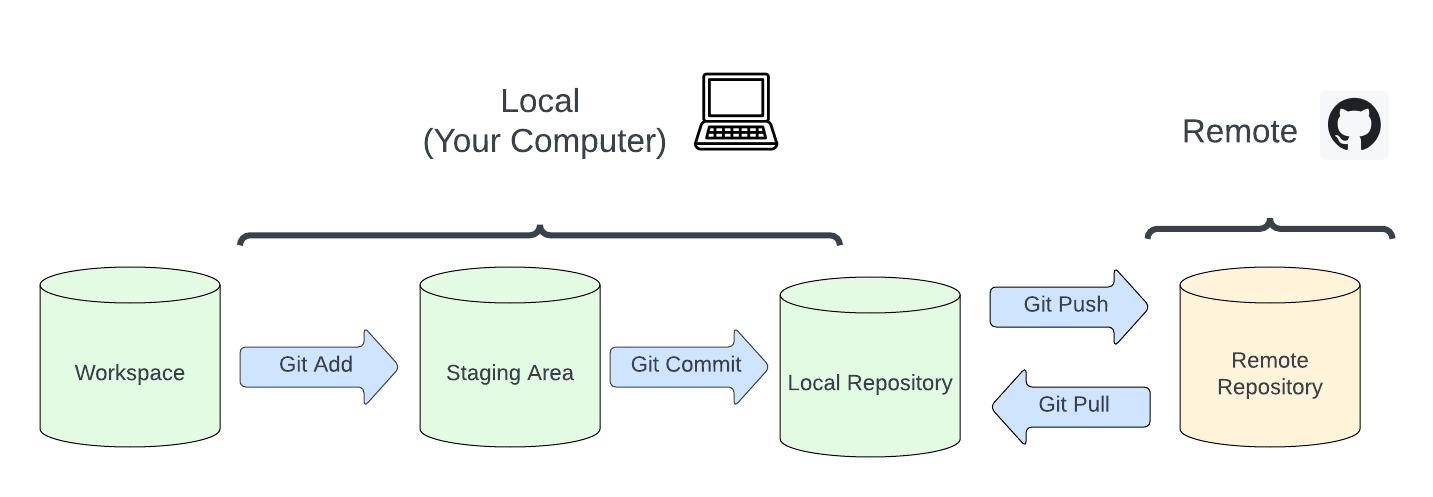
GitHub Workflow

GitHub Workflow – Git Add

To add files to staging area:

## add all changed files 
git add -A 

## add specific file
git add /path/to/file/file.txt

GitHub Workflow – Git Commit

Commit changes

## commit changes 
git commit -m "add an informative message here" 

GitHub Workflow – Git Push

Send (“push”) your changes up to remote repository (where collaborators / public can see)

## add all changed files 
git push

GitHub Workflow – Git Pull

Pull down changes from repository (e.g., changes your collaborator made)

git pull

Other features

  • Git Clone: Clone a remote repository to your local machine
## general command 
git clone https://github.com/username/repository-name.git

## clone the repository for this class 
git clone https://github.com/username/repository-name.git
  • Git fork: Copy a (public) repository to have your own version

  • Branches: Isolated enviroment for development, merge back in with man codebase when you’re ready

Live Demo

  • Adding new file to GitHub repository

  • OSF / GitHub replication package

Exercises (at home)

  1. Create a new Github repository

  2. Clone this GitHub repository to your local machine

  3. ‘Push’ an R markdown script to your GitHub Repository

LaTeX/Overleaf

LaTex

  • Latex is a high-quality typesetting system for writing scientific documents

  • Free, open source — customizable, extendable

  • Learning curve!

Insert equations

  • Use $ or \begin{equation} to enter equation mode

  • h(x) = αeβx

    h(x) = αeβx

Nicely handle refereces

  • Create a .bib file from list of reference

  • Automatically write out reference list

    • bibtex, natbib
  • In-text citations:

    • = (Gupta 2019)

    • = Gupta (2019)

Simplify tables + figures management

  • Include figures in text
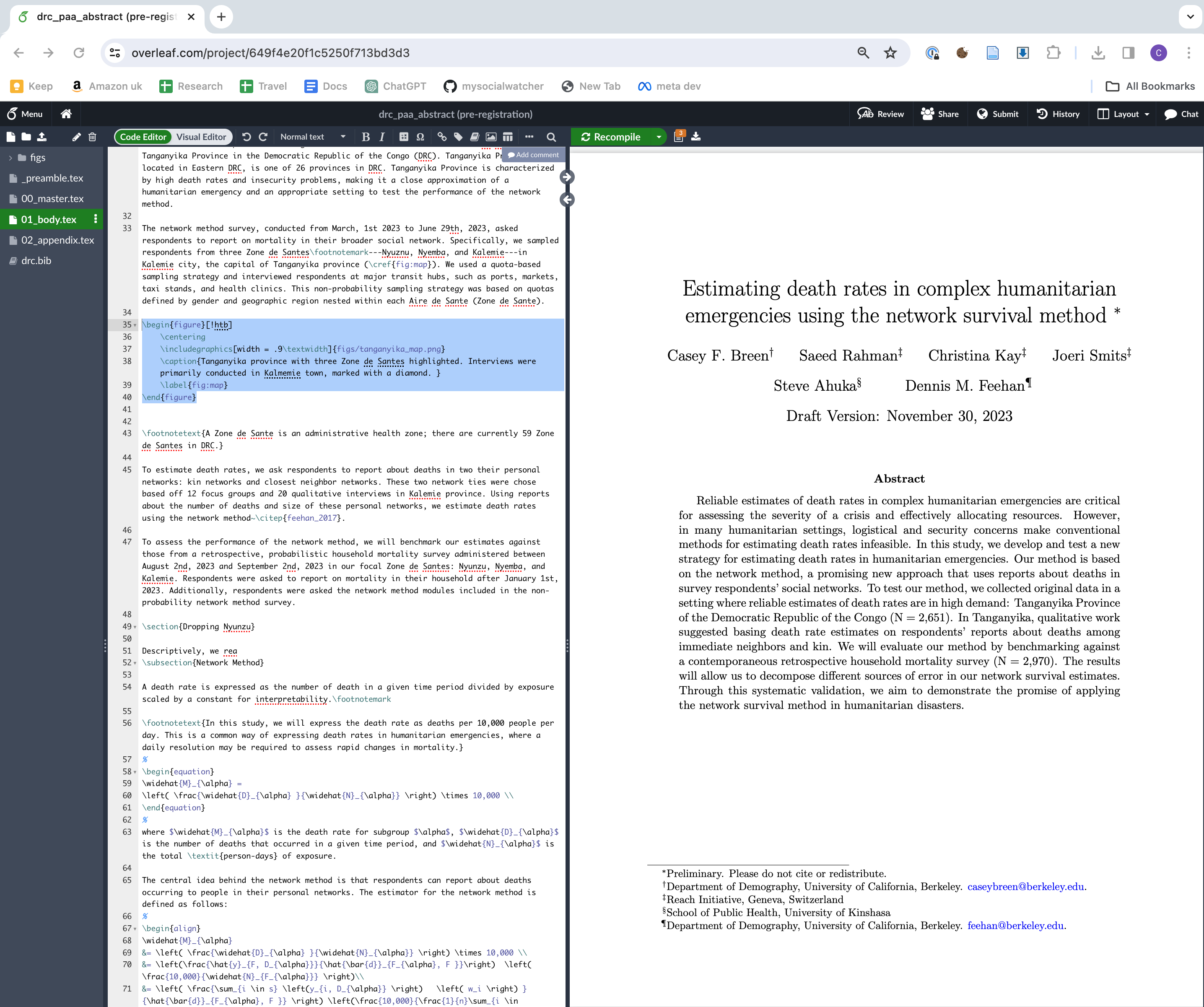
\begin{figure}[!htb]
    \centering
    \includegraphics[width = .9\textwidth]{figs/tanganyika_map.png}
    \caption{Tanganyika province with three Zone de Santes highlighted.}
    \label{fig:map}
\end{figure}
  • Reference figures and tables in text using label

    • will render “Figure 4”

Overleaf

  • Google Docs for LaTeX
  • See .tex code and the compiled PDF at the same time
  • Great for collaborating

Live Demo + Casey templates

Exercises (at home)

  1. Create a new overleaf project

  2. Upload and insert a new figure

  3. Write out a mathematical equation

  4. Share the overleaf document with a friend

R users: Quarto (markdown)

  • Designed for writing code

    • Interwoven text and code chunks
  • Can also write papers, take notes, make slides
  • Markdown is simpler than Latex, but fewer features / less resources for help

Zotero for reference management

Zotero

  • Free tool for simplifying reference management

  • Organize, annotate, and track references across devices

Simple Zotero workflow

  1. Add papers to Zotero to “collection”

    • Collection = set of references for one project
  1. Generate .bibtex file (or individual citations)
  1. Move .bibtex file to paper repository

Zotero tips

  • Zotero connector: browser plug-in the automatically add and pdf paper to a collection

  • Better Bibtex: help customize the different citation keys

  • Create shared libraries when working with collaborators

Zotero live demo

  • Creating new library

  • Adding paper using connector (or drag-and-drop pdf)

  • Generating bibtex file

Exercises (at home)

  1. Create a new Zotero collection

  2. Add 3 papers to the new collection (use Zotero connector or drag in PDFs)

  3. Export the .bibtex file to Overleaf

Takeaways

  • Lots of exciting resources for improving workflow

    • Many resources not mentioned
  • Pick workflow that works best for you

    • Definitely worth investing in your workflow!

More resources

Questions?

  • Thanks for your attendance and participation

  • Questions?